

SmarterQueue Review – Top Tool to Help Make Social Media Easy
When you run a business, time is at a premium and you want to find tools that help you do more with it. Or tools that let you get more from each thing you do. One of my go to tools to make social media easy is SmarterQueue.
As an Amazon Associate I earn from qualifying purchases and sometimes recommend products from other sellers at no extra cost you. For more details see my disclosure policy and privacy policy.
I’ve tried most of the big names such as Buffer, Hootsuite, CoSchedule and more. But I’ve come back to SmarterQueue once more. So here’s my SmarterQueue review to show why I’m a fan.
What is SmarterQueue?
Let me introduce you to SmarterQueue. It is a social media tool that lets you schedule your content to multiple platforms. So it is a relative of tools like Buffer, Meet Edgar, CoSchedule and the rest.
Currently, you can schedule to Facebook Pages and Groups, Twitter profiles, LinkedIn profiles and pages, Instagram and Pinterest. You can also connect a Bit.ly account to shorten and track your URLs for better analytics. There’s no automatic posting for Instagram yet but they are working on this.
The aim of SmarterQueue is to allow you to be consistent in your social media posting without having to physically post every time. You can set up your content on a pre-arranged schedule, fill up your queue and then come back when it is empty. For me, I fill up a week at a time although I would like to get further ahead at some point.
SmarterQueue Review
That’s a snap shot of what the tool does but you might be wondering what makes it different. What’s the SmarterQueue vs Buffer comparison or what features does it offer that makes it different to Hootsuite?
Categories and posting plan
Two of the standout features for me are the categories and posting plan. With SmarterQueue, you can categories your posts then add slots on your posting plan for each category. Here’s an example of some of the categories from my Facebook group:
- Daily threads (6 times a week at the same time)
- Pinterest tip (once a week on a Tuesday)
- Four separate categories for my blog post categories to share older posts
- Curated content
- Services and products
- Special share threads
- Quotes
- Freebies
- Affiliate products

Now many of those categories will overlap into other profiles. So when I create a post for the weekly Pinterest tip, I can also send it to my Facebook Page, LinkedIn profile and Twitter profile.
They can either all go out at the same time or if you set them differently, at different times. When you create a post for the Pinterest Tip category, SmarterQueue will slot it into the next available slot for that category.
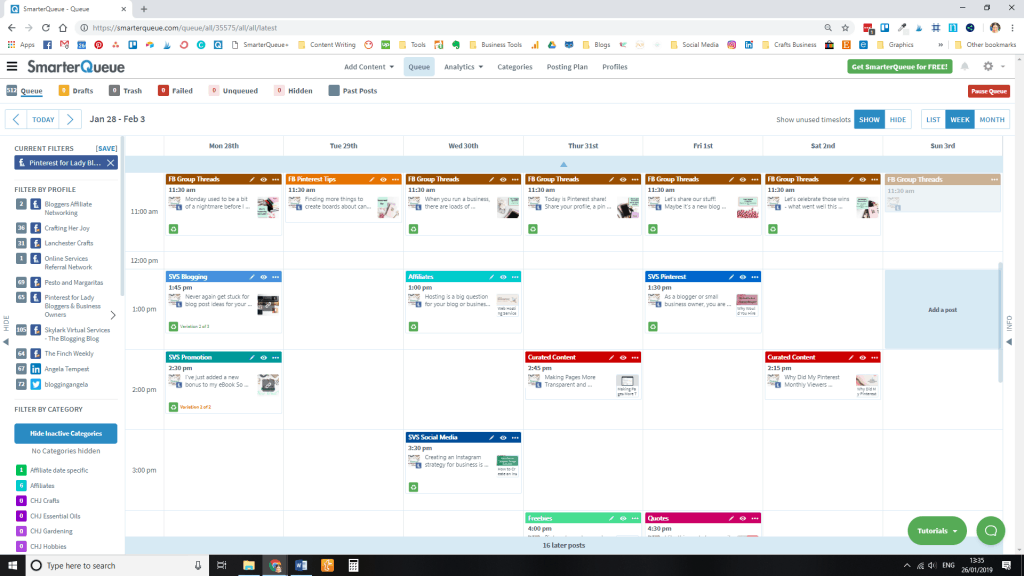
View your weekly plan
Another favourite is the weekly plan. This lets you select a profile and see what content you have scheduled for the week or month (but I use week mostly). You can also toggle on to see empty slots which helps you see what content you need to create to fill in the week’s posts. Maybe you need two pieces of content from other bloggers for that slot. Or you want to add a new freebie into the freebies category. Then you can easily spot it.
Evergreen content
Evergreen content is another reason why I love SmarterQueue and is something that a lot of tools like Buffer and Hootsuite are lacking. All this means is you can toggle a setting when you create a post and it will requeue it. The tool is also smart and will not post if you are at risk of spamming the account – it will prompt you to add more evergreen content to the category!
I use this mostly to recycle blog posts, service and product posts and some things like quotes. But you can make anything evergreen.
RSS feeds
I’m a big fan of curated content, offering interesting information from other bloggers and businesses that my audience will enjoy. And if they have an RSS feed, you can store them in SmarterQueue to easily access them and add to your queue. There’s no limit to how many you can have, you can arrange them into folders and there are even some suggested sources there when you first set up.
Other handy features
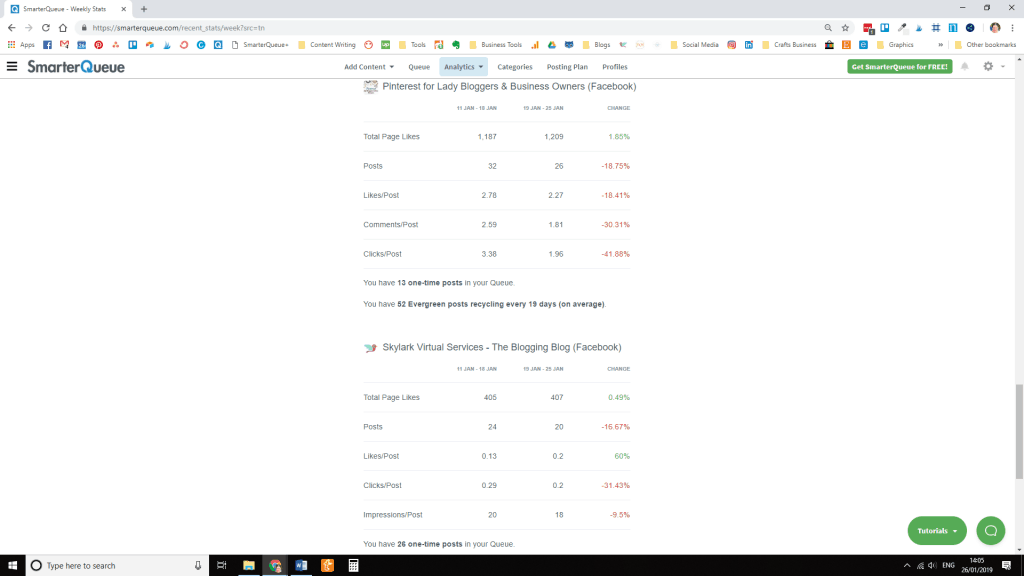
SmarterQueue also has a range of analytics built into the tool that lets you analyse your efforts. You can see:
- Past posts
- Reports
- Weekly stats
- Monthly stats
- Analyse social profiles
Instagram features
You can also view your Instagram top nine if you connect an Instagram account. If you have evergreen content on Twitter, there is also an option to review duplicate tweets. The system has a built-in way to cope with the rules about not re-tweeting something.
The past posts section is handy if you decide you want to requeue a post, add it as an evergreen post or simply requeue your most popular stuff. You can sort it by latest, most likes, highest likes %, most click and highest clicks % to help make informed decisions. There is also a re-share your best posts option under ‘add content’ that helps with this.
Bulk upload
When you first set up with SmarterQueue, a time saving feature is the bulk upload. This can be used for any website you add the RSS feeds – in other words, you can add your own. I quickly uploaded posts from my website, added them to the category and toggled on the evergreen setting to quickly have content being scheduled.
The tool stores media you upload for posts so if you use images for regular posts, you don’t have to upload them every time. You can also import posts from a CSV and search for content by search term, username, hashtags or URL.
Engage and Social Inbox
The latest features to be added to the SmarterQueue range are called Engage and Social Inbox.
Engage is a simple way to interact with content on Twitter and Facebook. It allows you to like, retweet or retweet with comment as well as like and comment on Facebook posts.
Social Inbox means you never need to worry about missing those customer messages or your response time dropping. You can save time with saved replies and those snippets you are always saying. It allows you to handle Facebook and Twitter messages all in one place.
SmarterQueue pricing
Now with any product, there’s always the question of cost and with SmarterQueue and all of these features, there is a cost. But having compared it, I must admit it is a sensible one.
There are three basic plans, all of which allow unlimited posts per profile, per day, unlimited categories and unlimited queued posts. The monthly plan pricing is based on how many profiles you connect:
- Solo – 4 social profiles £14.99 a month + VAT / $19.99 + VAT
- Business – 10 social profiles £29.99 + VAT / $39.99 + VAT
- Agency – 25 social profiles £59.99 + VAT / $79.99 + VAT
So if you have the standard Facebook Page, Group, a Twitter account and want to use it for LinkedIn, then the Solo plan is all you need. For me, with three businesses, I have the Business plan. You can upgrade and change at any time and you do get the prices cheaper if you pay annually (the saving is 15%).
Get started for free
Don’t forget you can try a free trial of SmarterQueue to see if it is the one for you!
The tool for me
To close my SmarterQueue review, I admit I’ve tried many of the others and came back to this one. It has the right balance of features, I like the ability to price according to how many profiles you have, and the features save me time. So it is definitely the tool that makes social media easier for me!


